Distant Horizons Mod: Download and Install Guide (26.3)
Distant Horizons: see about 4,000 blocks far in Minecraft 26.3
Vanilla Minecraft fades into fog after a couple of hundred blocks. Distant Horizons draws simplified far terrain (LODs) out to about 4,000 blocks by default. My side-by-side test, what it cost in FPS, the settings worth changing and fixes for stutter. Version 3.3.4 for Minecraft 26.3 is one file for Fabric and NeoForge.
Tested on Minecraft 26.3 (Fabric), Distant Horizons 3.3.4, October 15, 2026, AMD Ryzen 9 3900X, RTX 4070 Ti SUPER, default Distant Horizons settings. How I test
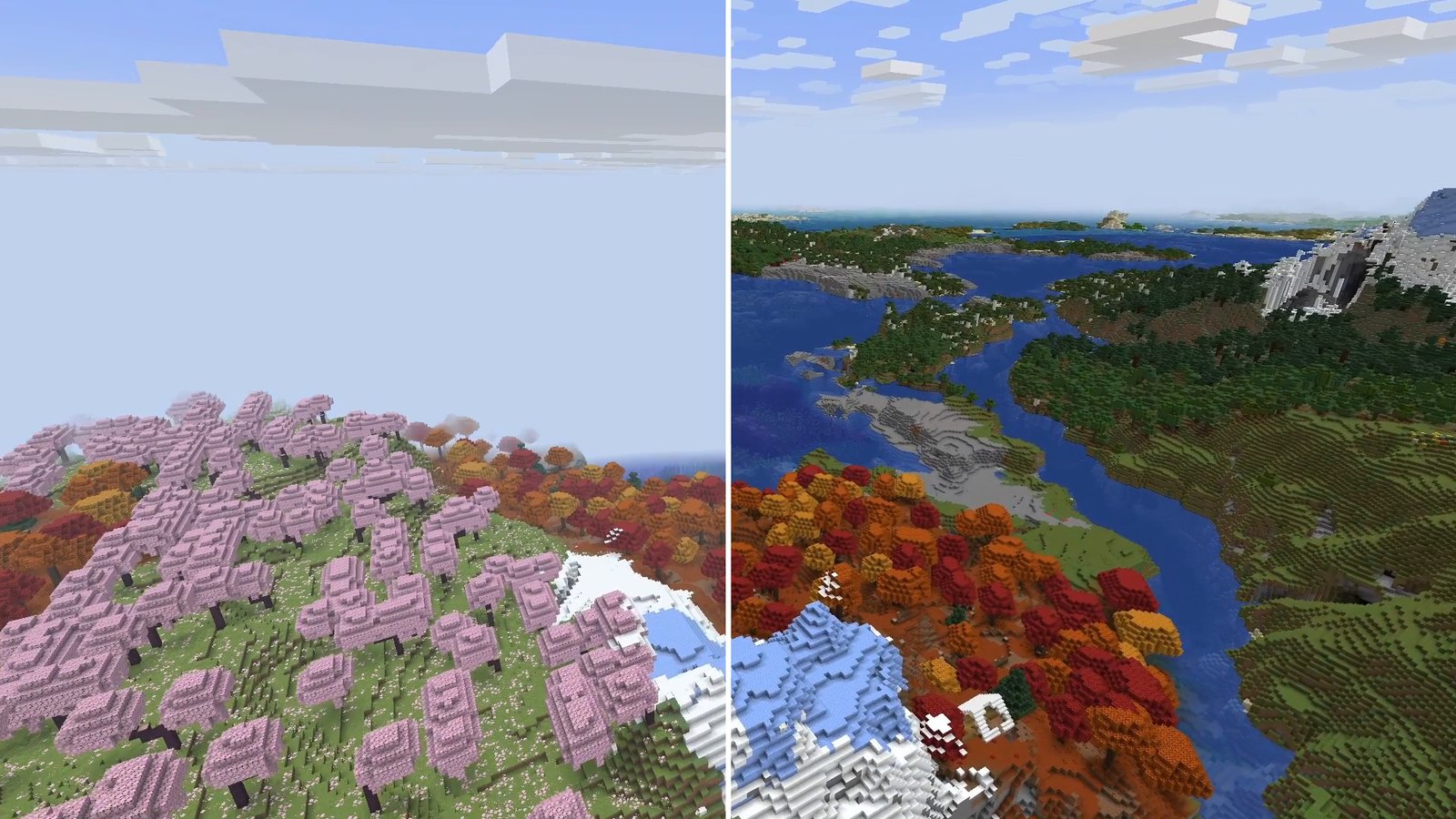
In vanilla Minecraft, the world ends in fog after a couple of hundred blocks. Distant Horizons pushes your view out to about 4,000 blocks by default, without loading more real chunks: beyond your normal render distance, it draws simplified copies of the far terrain. Version 3.3.4 is one file for Fabric and NeoForge on Minecraft 26.3, and it’s the mod that changed the look of my world the most.
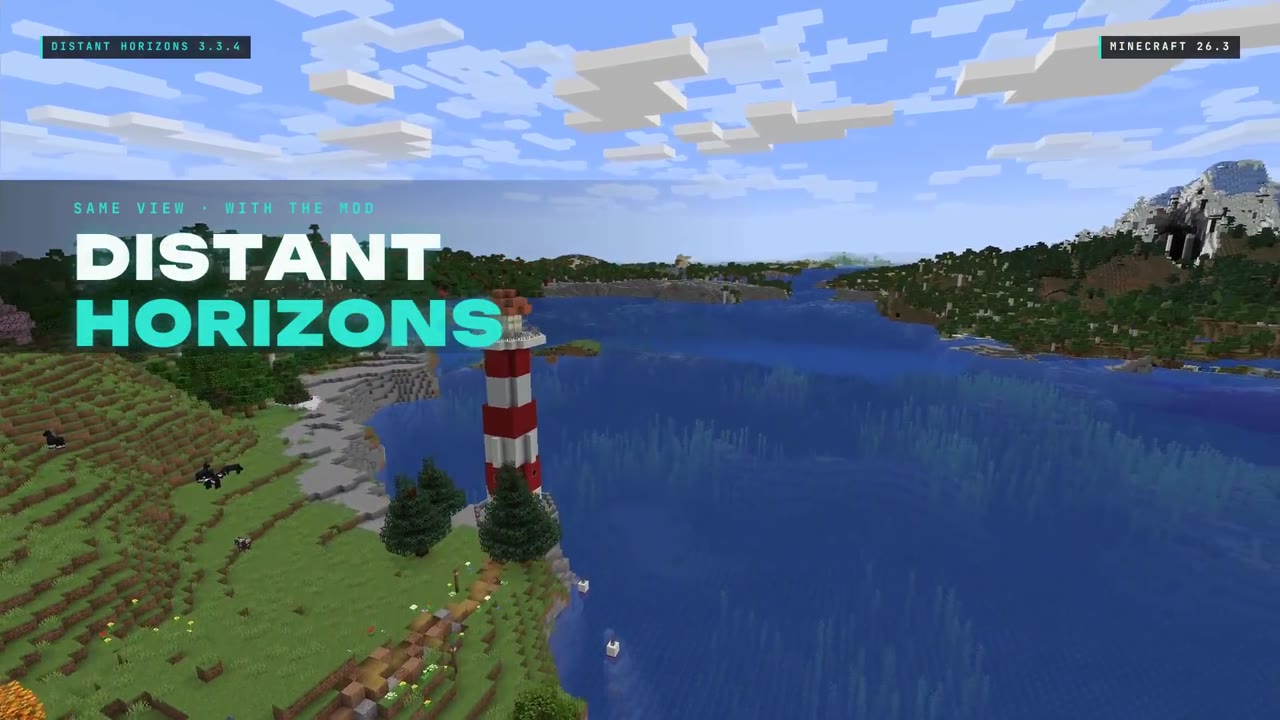 1:35
1:35 The short version
Distant Horizons for Minecraft 26.3
Playing loads the video from YouTube (privacy-enhanced mode), which may set cookies and process your data. Details.
What Distant Horizons does
Distant Horizons doesn’t raise your normal render distance. It builds LODs (levels of detail): simplified versions of the terrain far away, with less detail the farther away they are. It renders them on your graphics card with OpenGL or Vulkan, and player-built structures are included.
- Default distance: 256 chunks, about 4,000 blocks. You can set anything from 32 to 4,096 chunks. The source code calls it a “best effort number”: the real distance can be a bit higher or lower depending on your other graphics settings.
- First load: the LODs are built in the background, so a new world needs a few minutes. After that, they’re saved for your next session.
- Multiplayer: with the mod only on your side, it saves LODs of what you’ve explored. If the server has it too, the server sends the LODs to you.
My test results
On October 15, 2026 I flew the same camera paths twice in my world Valley of Mods on Minecraft 26.3 with Fabric: once in vanilla and once with Distant Horizons 3.3.4 and default settings. Before filming, every Distant Horizons run got about 12 minutes standing at one spot (four holds of 170 seconds) to build the LODs. In my first test run, every Distant Horizons clip passed my recorder’s stutter check.
- Over the bay: vanilla fades into fog, the island in front of the camera is all you get. With the mod, the coast keeps going to the horizon, with the mountains behind it.
- Around the snowy peak: with Distant Horizons, rivers, forests and the sea stay on screen during the whole flight.
- Low over the trees: flying just above the cherry groves, the hills on the horizon are already there.
FPS: at the same spot, with the F3 screen open, Distant Horizons at its default 256 chunks stayed mostly between 110 and 120 fps (once 99, right when F3 opened). Vanilla showed 120. Two things I have to be honest about:
- 120 was a cap. My graphics driver had a frame-rate limit of 120 set (Max Frame Rate in the NVIDIA settings), which I only found on October 20. So 120 is the ceiling of these recordings, and I can’t tell you how far above 120 either side would have gone.
- My vanilla render distance. I first wrote that vanilla was at its maximum of 32 chunks for that FPS check. Later I found that Minecraft 26.x’s “Fancy” graphics preset overrides the render distance, and that vanilla run actually ran at 16 chunks. My vanilla comparison flights were set to 12 chunks, but because of the same preset I can’t promise they stayed at 12.
With shaders: on the same PC (AMD Ryzen 9 3900X, RTX 4070 Ti SUPER) I also ran Distant Horizons with Iris and the Complementary Unbound shader pack. With the screen recorder running, F3 showed 55 to 57 fps.
In my Minecraft 26.3 tier list Distant Horizons is in S tier at #2.
Settings worth changing
The first four are in the Distant Horizons config menu. Defaults from the 3.3.4 source code, tips from the developers’ FAQ:
- Render distance: 256 chunks by default (32 to 4,096). Lower it if your PC struggles, raise it if you want even more.
- Quality preset: Medium by default. If the game stutters, the FAQ’s last tip is a lower graphics preset in the DH config.
- Thread preset: Balanced by default. The FAQ also suggests lowering DH’s CPU load in its config if the game stutters.
- Distant Generation: on a server, players with the mod and Distant Generation enabled get LODs sent by the server. The FAQ also lists turning it off as a fix for stutter.
- Java garbage collector: not a DH setting, but the FAQ’s first tip: a concurrent garbage collector, ZGC on Java 21 and newer (Shenandoah on Java 8 to 17), set in your launcher’s Java arguments.
Compatibility
- Loaders: for Minecraft 1.20.6 and newer, one file for Fabric and NeoForge. Version 3.3.4 for 26.3 lists no dependencies on Modrinth.
- Client or server: optional on both sides. For Bukkit-based servers there’s a separate plugin, Distant Horizons Support.
- Shaders: Iris 1.7 or newer with shader packs that support Distant Horizons. With OptiFine, only forward-rendered shaders partly work. The 3.3.4 changelog fixes Iris on 26.3 drawing transparent LODs wrongly when a boat is on screen.
- Sodium and Iris: my shader run used Distant Horizons together with Iris and Sodium (Iris needs Sodium).
Troubleshooting
- Far terrain missing in a new world: wait a few minutes while the LODs build. Fly up and look around afterwards.
- No far terrain in multiplayer: with the mod only on your side, you have to explore first. For LODs from the server, the server needs Distant Horizons and you need Distant Generation enabled.
- Stutter: the FAQ’s order is: concurrent garbage collector, more RAM (6 to 8 GB for 4 to 8 CPU cores, 12 to 16 GB for 10 or more), lower CPU load, Distant Generation off, lower graphics preset.
- No LODs with shaders: your shader pack has to support Distant Horizons, and you need Iris 1.7 or newer.
Alternatives
- Vanilla render distance: goes up to 32 chunks, 512 blocks, with real chunks instead of LODs. Sodium gives you more frames at normal render distances.
- Iris with a Distant Horizons shader pack: if you want the far view and lighting on top.
- Xaero’s World Map: if you want to know what’s out there rather than see it, a full-screen map of everything you’ve explored.
How to install Distant Horizons
- Install a loader: Fabric or NeoForge for Minecraft 26.3.
- Download Distant Horizons 3.3.4 from the official Modrinth page and drop the file into your mods folder.
- Load your world and wait a few minutes while the LODs build, then fly up and look around.
New to Fabric? My Fabric install guide for 26.3 walks through every step.
Verdict
Distant Horizons is for anyone who builds, explores or takes screenshots and is tired of the fog.
- Pro: about 4,000 blocks of view by default, without loading more real chunks.
- Pro: one file for Fabric and NeoForge, no dependencies.
- Pro: works with Iris shaders that support it, and on servers.
- Con: a new world needs a few minutes before the far terrain is there.
- Con: it does cost frames. How many on your PC depends on your hardware and settings; my numbers were capped at 120.
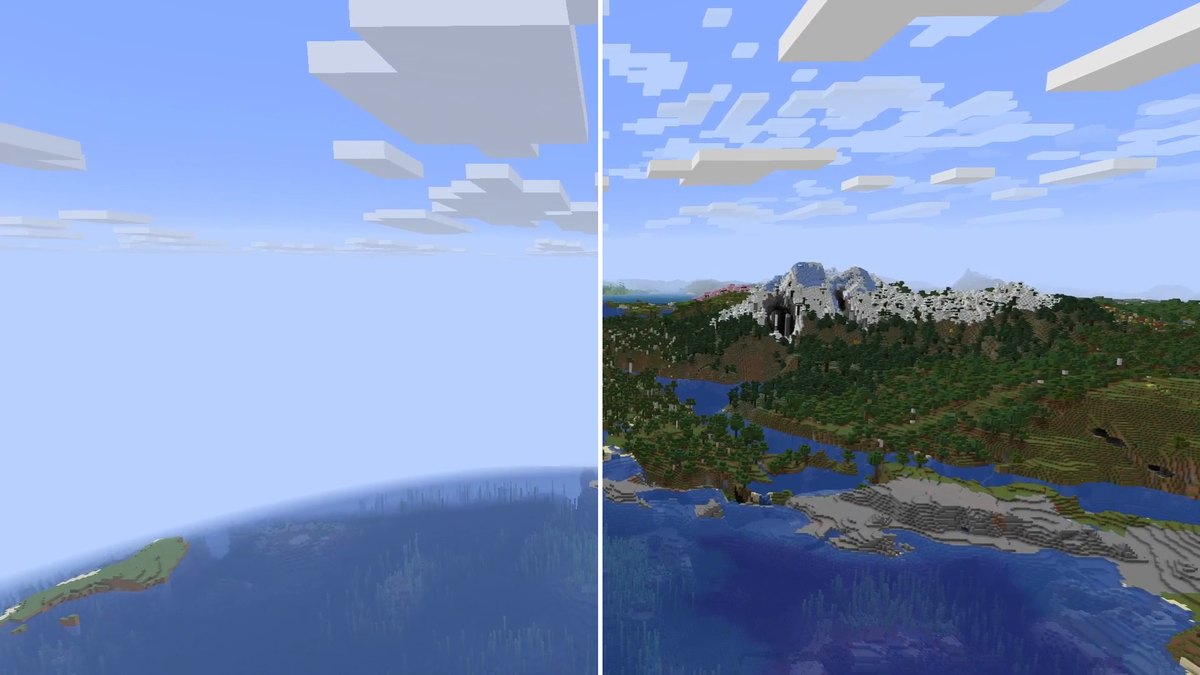
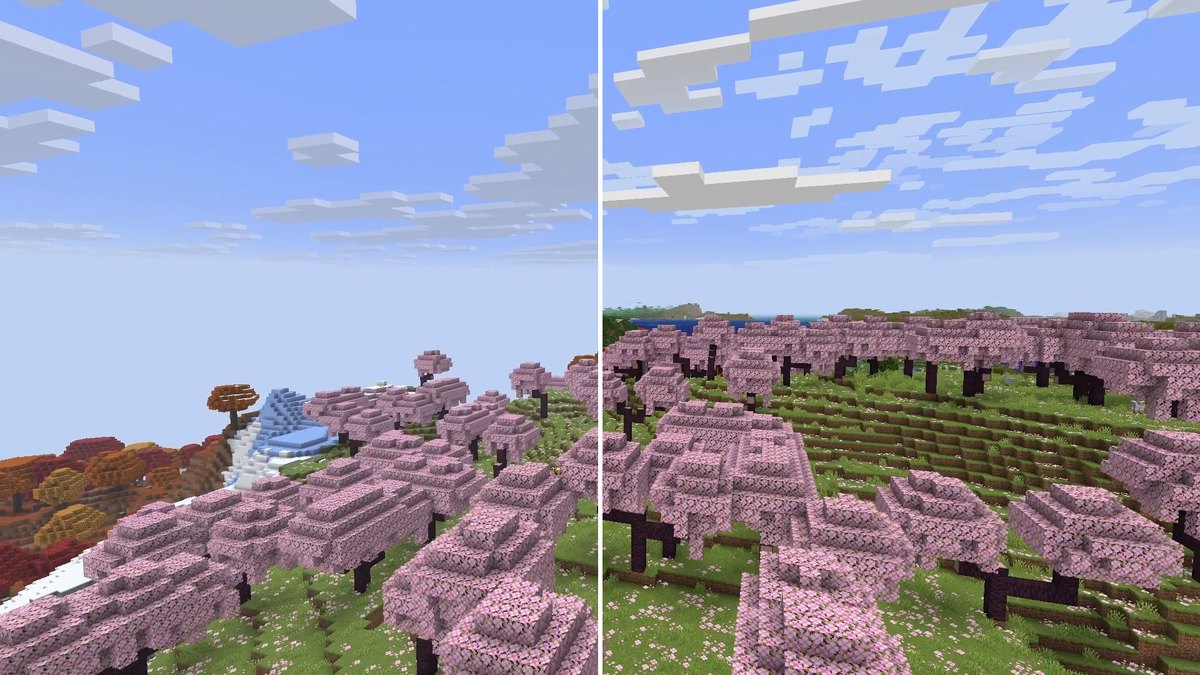
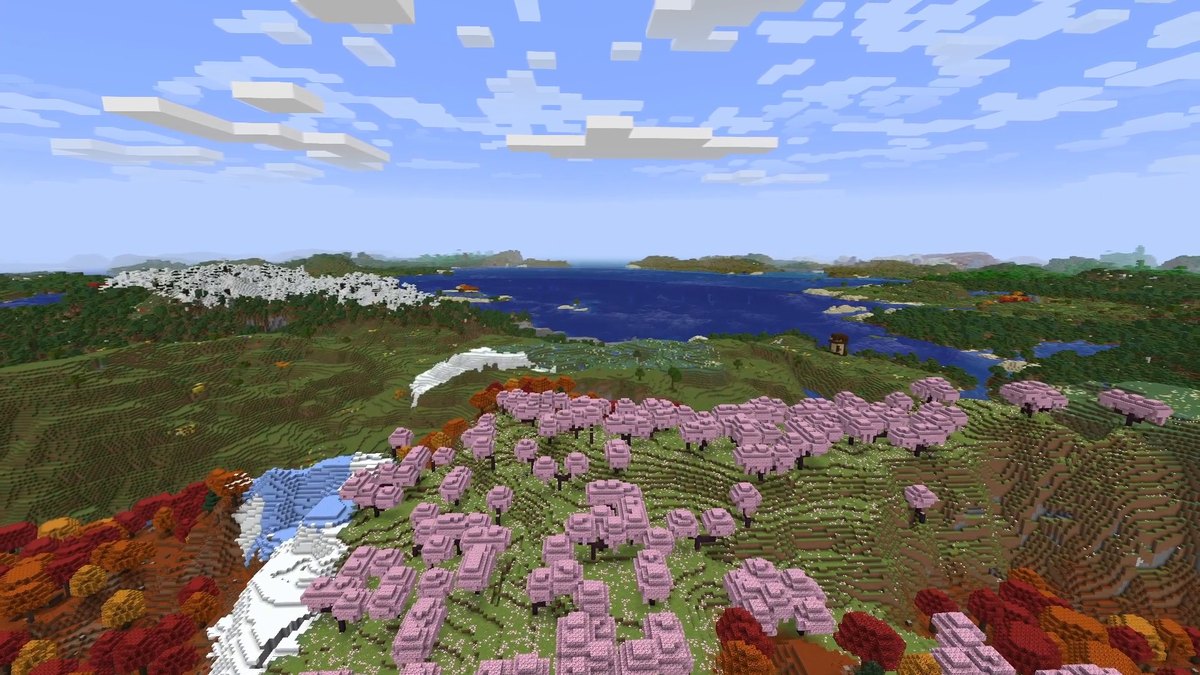
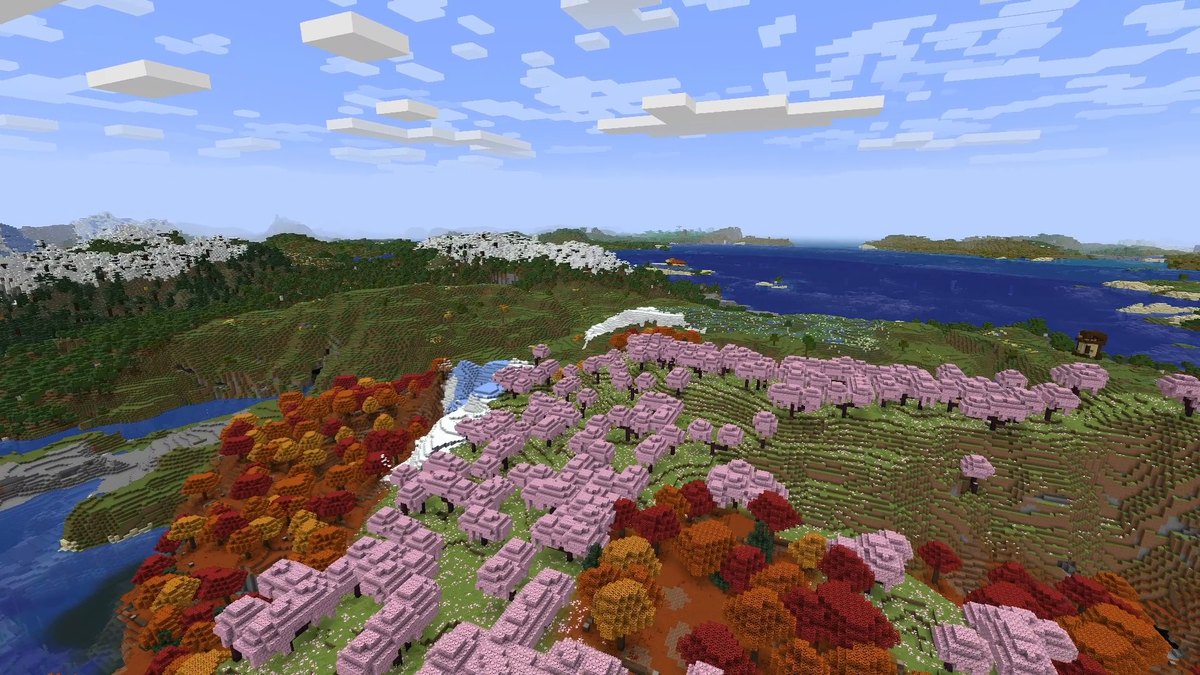
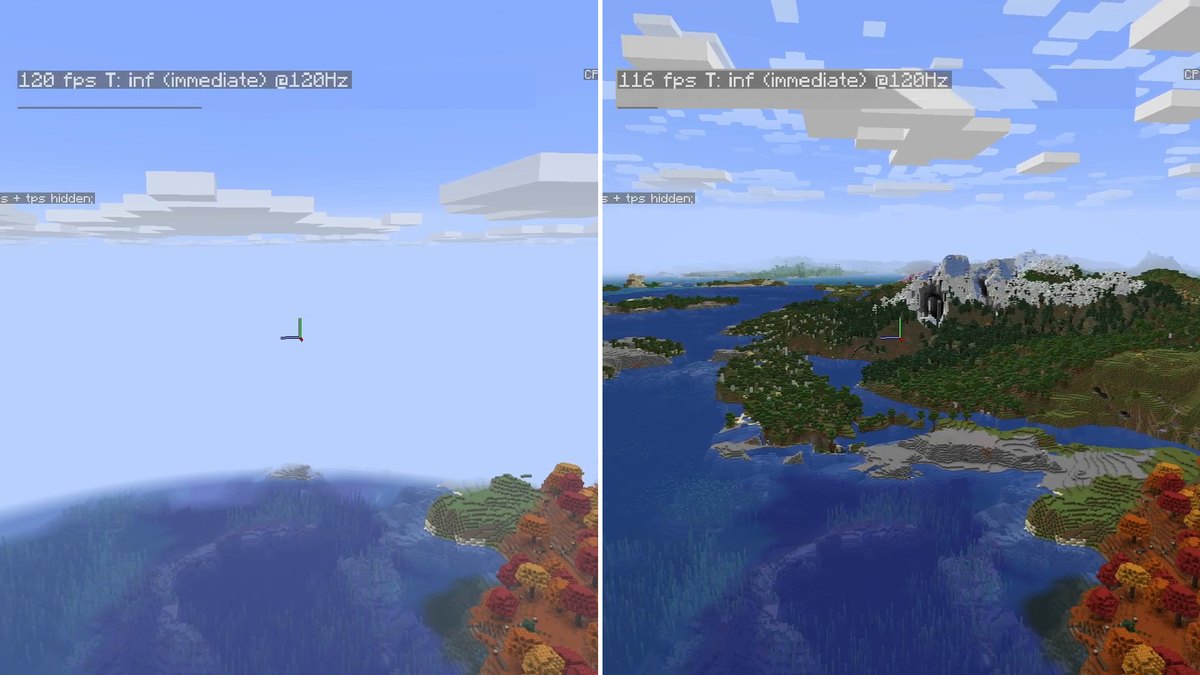
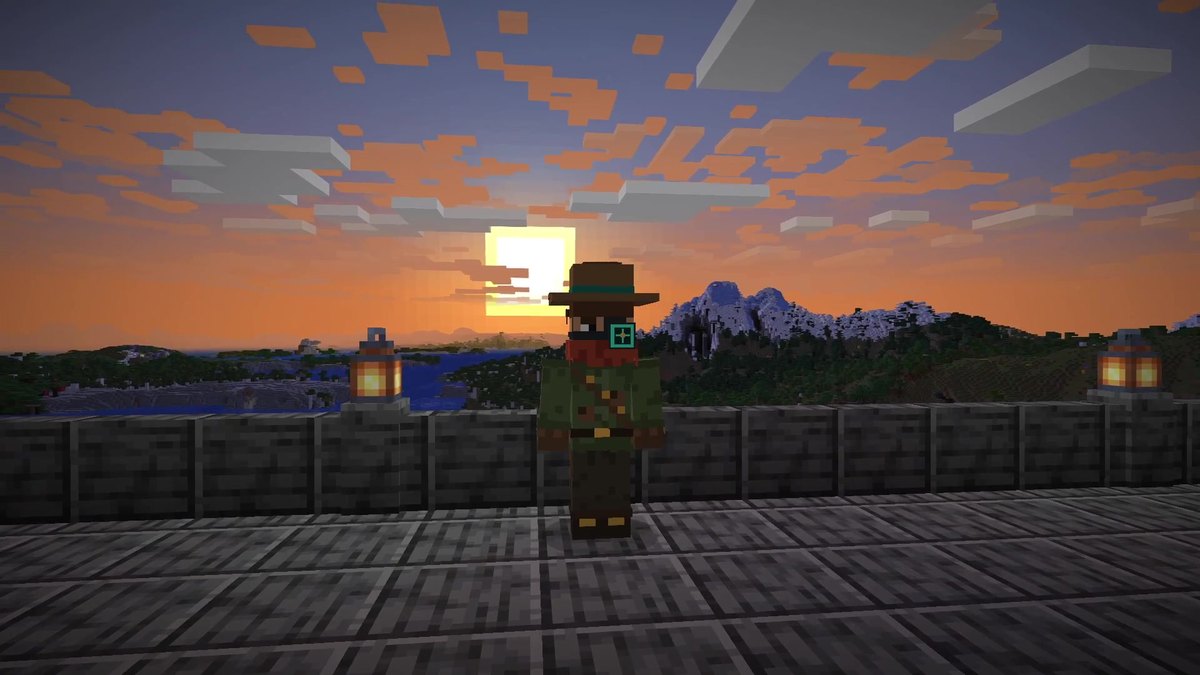
Real in-game screenshots from Minecraft 26.3, recorded on October 15, 2026 in my world Valley of Mods with the same camera paths, once in vanilla and once with Distant Horizons 3.3.4 and default settings.
FAQ
Is Distant Horizons available for Minecraft 26.3?
Yes. Version 3.3.4 for Minecraft 26.3 was released on September 29, 2026, as one file for Fabric and NeoForge.
How far can you see with Distant Horizons?
By default, the mod’s render distance is 256 chunks, about 4,000 blocks in every direction. You can set it between 32 and 4,096 chunks. The developers call it a best-effort number: the real distance can be a bit higher or lower depending on your other graphics settings.
Does it load more chunks?
No. Your normal render distance stays as it is. Beyond it, Distant Horizons draws simplified versions of the terrain, called LODs (levels of detail), on your graphics card.
How much FPS does it cost?
On my PC (RTX 4070 Ti SUPER) Distant Horizons at its default 256 chunks stayed mostly between 110 and 120 fps, while vanilla showed 120. My graphics driver capped everything at 120 at the time, so the real difference above 120 wasn’t measured. With Iris and the Complementary Unbound shader pack on top, I got 55 to 57 fps.
Why is the far terrain missing when I first load a world?
Distant Horizons builds the LODs in the background the first time, which takes a few minutes. After that they are saved for your next session.
Does it work in multiplayer?
Yes. With the mod only on your client, it saves LODs between sessions, but you have to explore the world to load them. If the server runs Distant Horizons too, it sends the LODs to every player who has the mod and Distant Generation enabled.
Does it work with shaders?
Yes, through Iris 1.7 or newer and only with shader packs that support Distant Horizons. With OptiFine it only partially works, with forward-rendered shaders.
Does it need Fabric API?
Version 3.3.4 for Minecraft 26.3 lists no dependencies on Modrinth.
My game stutters with Distant Horizons, what can I do?
The developers’ FAQ suggests a concurrent garbage collector first: ZGC on Java 21 and newer, set in your launcher’s Java arguments. After that: more RAM, a lower CPU load and graphics preset in the Distant Horizons config, or Distant Generation off.
Sources
What changed
- Corrected my FPS comparison (120 FPS driver cap, vanilla render distance), added my shader measurement, the settings worth changing, compatibility notes, troubleshooting and alternatives.
- First published.