How to Install Resource Packs in Minecraft 26.3
How to install resource packs and texture packs in Minecraft 26.3
The exact menu path, where the resourcepacks folder is, why the top pack wins, what the warning "Made for an older version of Minecraft" means and which packs need a mod. With fixes for the problems I ran into while testing ten packs.
Tested on Minecraft 26.3, with the ten packs from my two pack lists. How I test
Resource packs and texture packs install the same way in Minecraft Java 26.3, no mods or extra tools needed. This guide shows the exact menu path, the order rule that decides which pack wins, and fixes for the problems I ran into while testing ten packs for my two pack lists.
Resource pack or texture pack?
Same thing today. Resource packs replaced texture packs back in Minecraft 1.6.1. A resource pack can change textures, models, sounds, music, languages and fonts without touching the game’s code, and “texture pack” is simply what most players call a pack that mainly changes textures, like Faithful 64x. Everything on this page works for both.
This guide is for Java Edition. Bedrock packs work differently: they usually come as .mcpack files that Minecraft imports when you open them.
Install a resource pack step by step
- Download the zip from the pack’s official page, usually Modrinth, CurseForge or the author’s own website. Pick the file made for your game version, here 26.3.
- Open Options, then Resource Packs in Minecraft.
- Click Open Pack Folder. The game opens its resourcepacks folder.
- Put the zip into that folder and leave it zipped. You can also drag the zip straight into the Resource Packs screen: Minecraft asks “Do you want to add the following packs to Minecraft?” and copies it into the folder for you.
- Select it. The pack shows up under Available. Click it to move it over to Selected.
- Click Done. Minecraft reloads its resources with the new pack.
If the pack doesn’t show up, go back to the title screen and open Resource Packs again.
Where the resourcepacks folder is
| System | Folder |
|---|---|
| Windows | %appdata%\.minecraft\resourcepacks |
| macOS | ~/Library/Application Support/minecraft/resourcepacks |
| Linux | ~/.minecraft/resourcepacks |
Launchers with separate instances, like Prism Launcher, which I use for my tests, give every instance its own resourcepacks folder. That’s why I always use the Open Pack Folder button: it opens the folder of the game that’s actually running.
Keep the zip as it is
Minecraft reads a resource pack either as a .zip file or as a folder, and it recognizes a pack by the file pack.mcmeta at the top level. That’s where unpacking goes wrong: if you unzip and end up with a folder inside a folder, pack.mcmeta sits one level too deep and the game doesn’t see a pack. Leave the zip as it is and this can’t happen. If you drag in something that isn’t a valid pack, Minecraft tells you: “The following entries were not valid packs and were not copied”.
Pack order: the top pack wins
You can select several packs at once. Minecraft loads the bottom pack in the Selected list first, and every pack above it replaces or adds to what’s below. So when two packs change the same block, the higher one wins. What worked in my tests:
- Complete texture packs at the bottom. Faithful, Alacrity and the like change almost everything.
- Small packs that change one thing above them. Grass sides, tree trunks, lanterns.
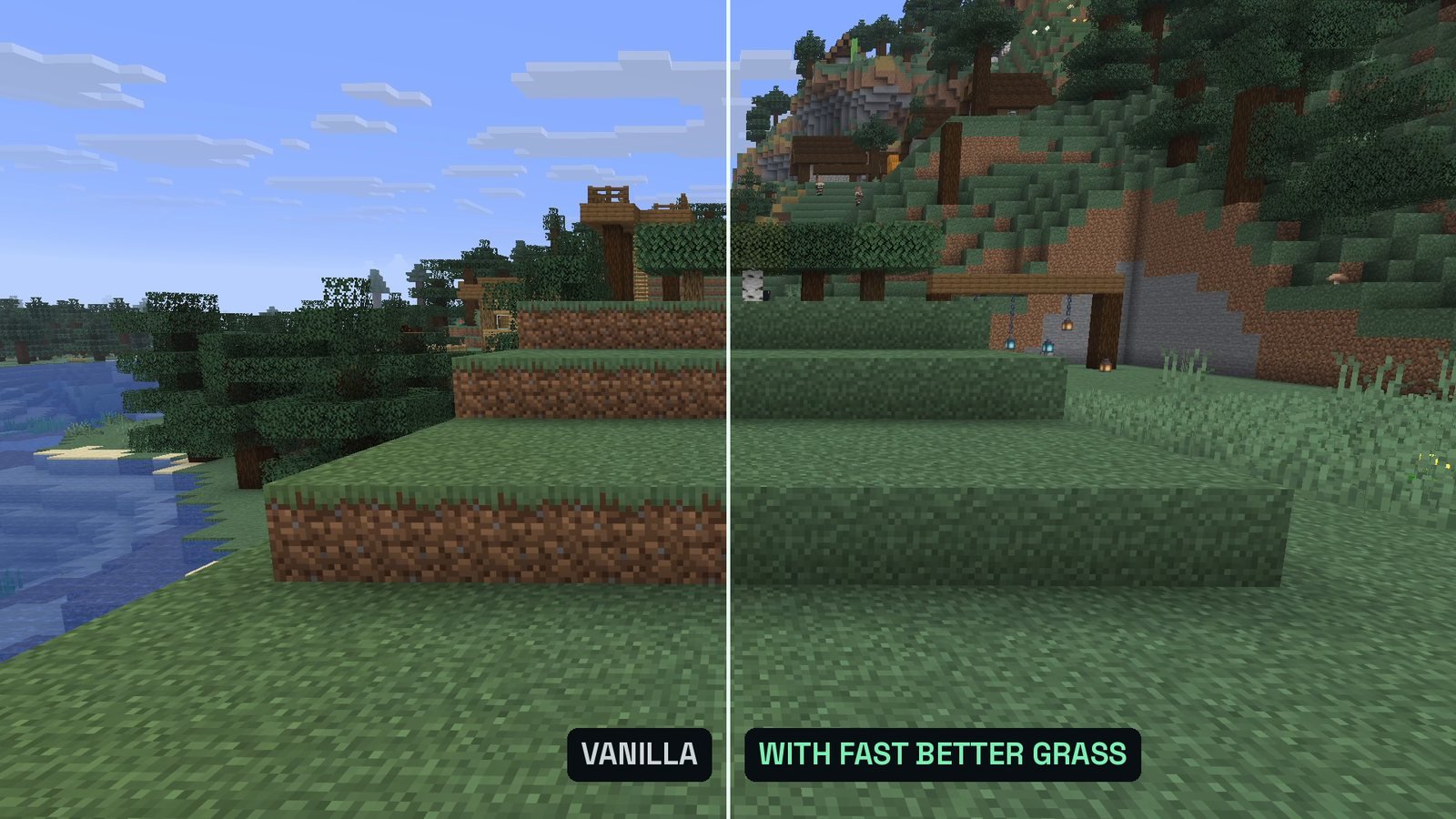
- Follow the author. Fast Better Grass says in its pack description that it must be the first to work, Round Trees wants to be on top, and Golden Days goes on top of Programmer Art.
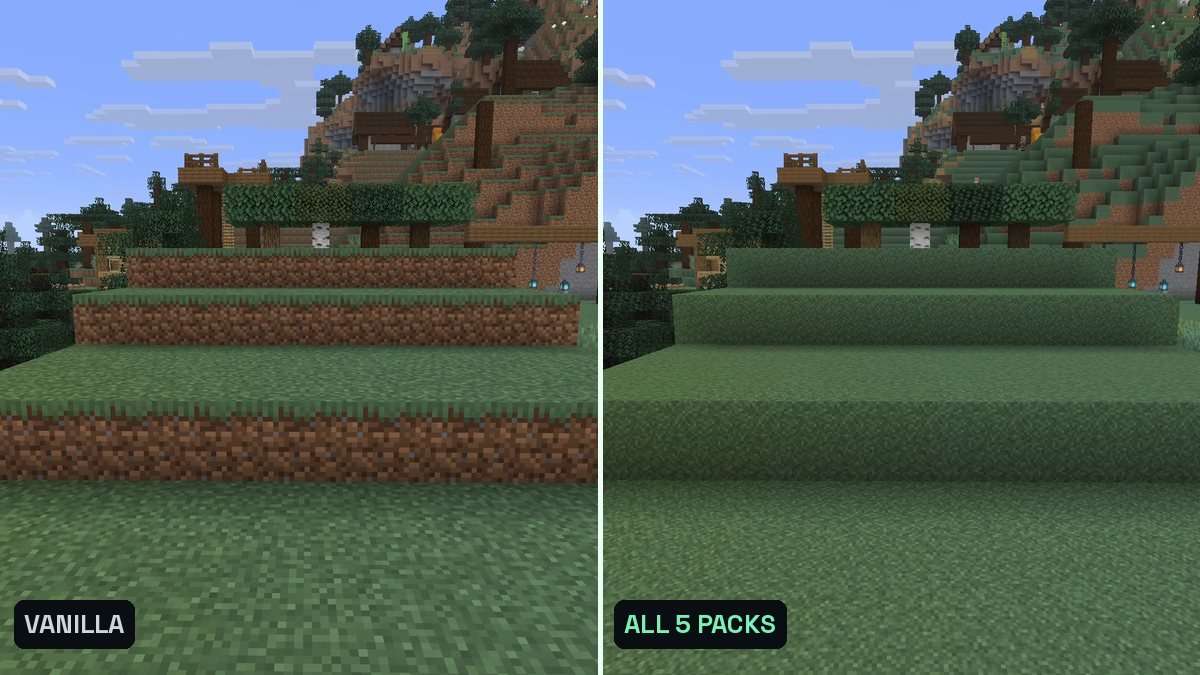
The full order for those five packs is in my list: the right order.
Built-in packs: Default, Programmer Art and High Contrast
Three packs come with the game:
- Default: the normal look. It’s always selected and can’t be turned off.
- Programmer Art: the old textures from before Minecraft 1.14. Golden Days needs it below itself, otherwise the pack doesn’t work as intended.
- High Contrast: more contrast in the menus.
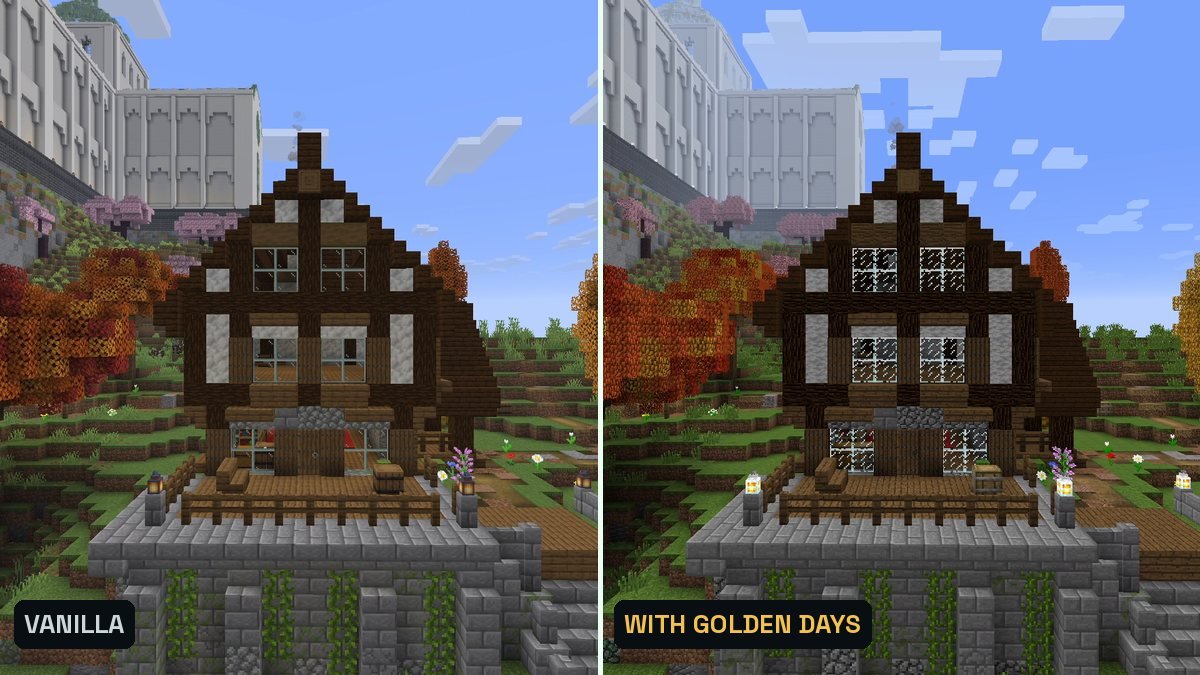
“Made for an older version of Minecraft”
Every pack states in its pack.mcmeta which pack formats it supports. Minecraft 26.3 uses resource pack format 97.1. If a pack’s range doesn’t include it, the Resource Packs screen marks the pack with one of these notes:
- “(Made for an older version of Minecraft)”
- “(Made for a newer version of Minecraft)”
- “(Broken or incompatible)”
If you select it anyway, the game asks “Are you sure you want to load this pack?” and warns that it “may no longer work correctly”.
What I learned the hard way: the version tag on a download site isn’t proof. Ashen 1.17.1 was tagged for 26.3 on Modrinth, but its pack.mcmeta only went up to format 89. Minecraft 26.3 marked it as incompatible, and in my test setup, which selects packs through the game’s settings file, it didn’t load at all. Every recording showed plain vanilla. Since then I read the pack.mcmeta of every pack before I test it.
The fix: look on the pack’s official page for a file made for 26.3. If there is none, you can confirm the warning and try it, but the game itself tells you it may not work correctly.
Packs that need a mod
Plain textures, block models, sounds and fonts work in vanilla. Some packs also ship extra features in OptiFine’s formats, and those only show up with OptiFine or with a Fabric mod that reads the format. Whimscape’s page lists them clearly, and the same mods come up again and again:
| Feature in the pack | Fabric mod that loads it |
|---|---|
| Connected textures (glass without frames) | Continuity |
| Emissive textures on blocks and items | Continuity |
| Custom entity models | Entity Model Features |
| Random and emissive mob textures | Entity Texture Features |
| Custom sky and fog colors | Polytone |
- Continuity loads packs in OptiFine’s connected textures format and comes with two built-in packs that you have to turn on in the Resource Packs screen: Default Connected Textures and Glass Pane Culling Fix. My Continuity guide shows how.
- Entity Model Features needs Entity Texture Features installed as well, according to its page.
- Examples from my lists: Alacrity and Whimscape load fine without mods, the extras need the mods above. Excalibur’s random mobs only work with OptiFine. Golden Days works with Polytone and Entity Model Features and, according to its page, no longer supports OptiFine. Fresh Animations animates mobs with custom entity models, so it needs OptiFine or Entity Model Features plus Entity Texture Features.
The pack’s own page is the place to check which of its features need what.
Shaders are not resource packs
Shader packs like Complementary or BSL bring real-time shadows, reflections on water and glowing light. They don’t go into the resourcepacks folder. They need a shader mod like Iris, which runs on top of Sodium, go into the shaderpacks folder and are switched on under Video Settings, Shader Packs. My Iris guide walks you through it.
Some resource packs are made for shaders (PBR packs with extra material maps) and show their full effect only with a shader. I left those out of my lists.
Server resource packs
A server can offer its own resource pack. When you join, you decide whether to download it. If the server requires the pack, refusing it disconnects you. In your server list, each server’s settings have the option Server Resource Packs with Enabled, Disabled or Prompt.
Troubleshooting
- The pack isn’t in the list. Check that the zip is in the folder that Open Pack Folder opens and that pack.mcmeta is at the top level of the zip, then open the Resource Packs screen again. A .jar file is a mod, not a resource pack, and belongs in the mods folder.
- It says “Made for an older version of Minecraft”. Get the 26.3 file from the official page, see the compatibility warning.
- It’s selected, but nothing changes. Another pack above it may change the same blocks: move it up. Check the pack page for a required base pack (Golden Days needs Programmer Art) or a mod (connected glass needs Continuity, plus its built-in packs turned on).
- Fast Better Grass does nothing. Put it at the very top. Its description says it must be the first to work.
- You changed files in a pack. Press F3 + T to reload resource packs without restarting the game.
Download packs safely
- Only from the official page. That’s Modrinth, CurseForge or the author’s own website, as linked by the author. The Faithful team says it plainly on its page: downloads from any other site are unofficial, unsupported and could be dangerous.
- Many authors don’t allow re-uploads. Alacrity forbids re-hosting on other websites, Golden Days may only be shared through its official download links, and OS’ Colorful Grasses says “Do not redistribute”. A copy on another site is then an upload the author never allowed.
- A resource pack is a .zip file or a folder. Minecraft reads packs in no other form. If a “resource pack” download hands you an .exe, it isn’t one. Don’t run it.
- My rule for this site: every download button goes to an official page. I never re-host files.
FAQ
Do I need OptiFine or a mod to use resource packs?
No. Textures, block models, sounds and fonts from a resource pack work in vanilla Minecraft. Only extra features in OptiFine’s formats, like connected textures or custom entity models, need OptiFine or a Fabric mod that reads them, for example Continuity.
Can I use more than one resource pack at a time?
Yes. Select as many as you like. When two packs change the same thing, the one higher up in the Selected list wins.
Why does my pack say "Broken or incompatible"?
Minecraft can’t match the pack to its own pack format (97.1 in 26.3), or it can’t read the pack file at all. Look for a version made for 26.3 on the pack’s official page.
How do I remove a resource pack?
Click it in the Selected list to move it back to Available, then click Done. To remove it for good, delete the zip from the resourcepacks folder.
Do Java resource packs work on Bedrock?
No. Bedrock packs are built differently (a manifest.json instead of a pack.mcmeta) and usually come as .mcpack files that Minecraft imports when you open them.
Which resource packs should I try first?
My two tested lists: 5 resource packs that need no mods and 5 complete texture packs, tested on 407 blocks.
Sources
- Minecraft Wiki: Resource pack
- Minecraft Wiki: Tutorial, loading a resource pack
- Minecraft Wiki: Pack format
- Continuity on Modrinth
- Entity Model Features on Modrinth
- Entity Texture Features on Modrinth
- Polytone on Modrinth
- Whimscape on Modrinth (features and the mods they need)
- Fresh Animations on Modrinth
- Golden Days on Modrinth
- Fast Better Grass on Modrinth
- Round Trees on Modrinth
- Faithful 32x on Modrinth (official download sources)
- Alacrity on Modrinth (terms of use)
- OS' Colorful Grasses on Modrinth (usage rights)