Hytale Quality of Life Mods for Update 7 (0.7)
7 Hytale mods that make the game way more comfortable (Update 7)
Seven quality of life mods for Hytale Update 7, all tested in 0.7.2: Where this at?, Automatic Storage, Repair Workbench, Adoa's Minimap, Advanced Item Info, Recover Arrows and Better Modlist. How I set each one up, what it costs, and how to install mods with the in-game mod browser.
Tested on Hytale 0.7.2 (Update 7), October 14, 2026, in a test world with a storage wall built for the video, all mods installed through the in-game mod browser. How I test
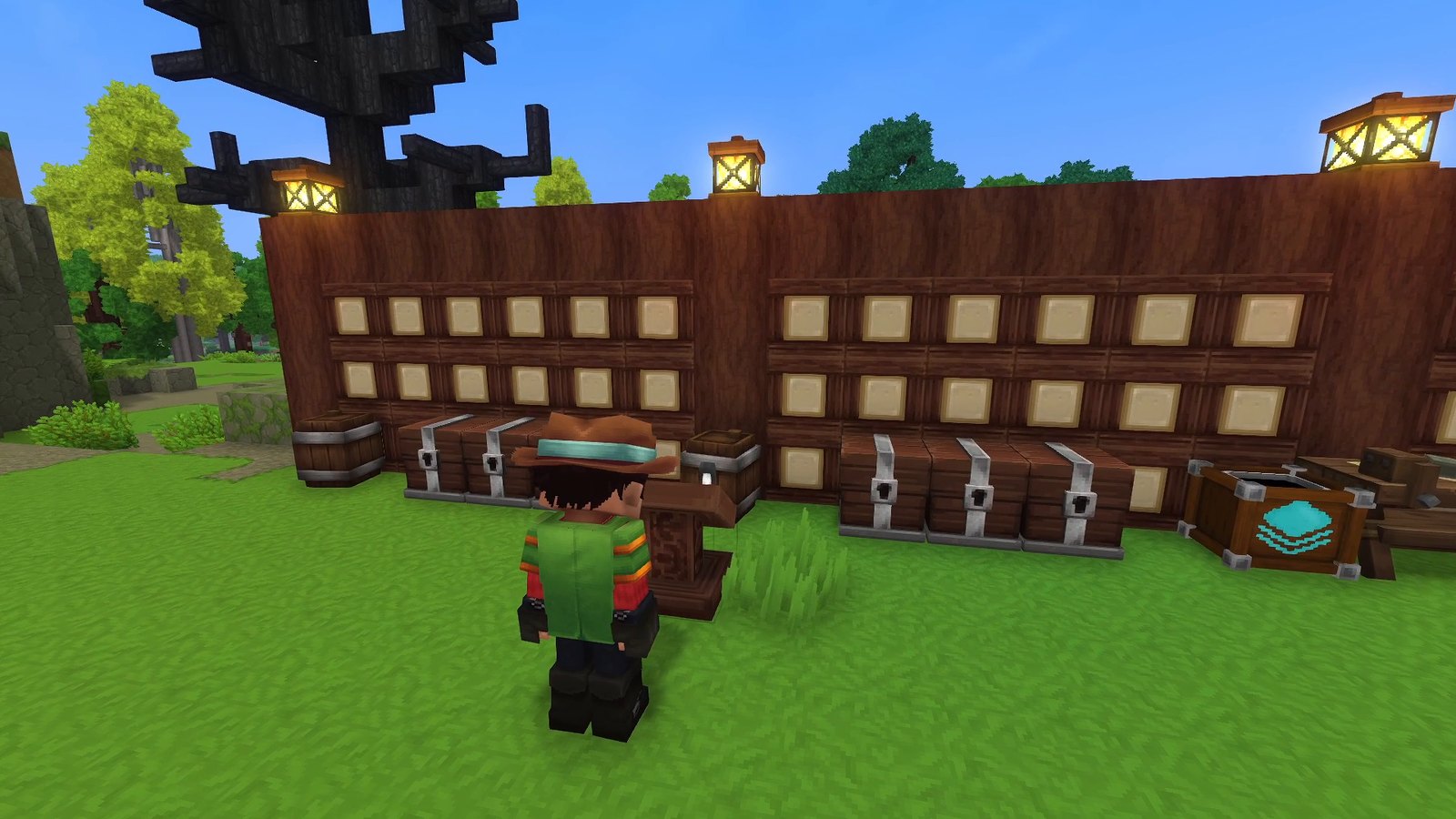
Seven mods that take the busywork out of Hytale: finding items, sorting loot, repairing tools, keeping your arrows. All of them have an Update 7 file, and I tested every one in Hytale 0.7.2. If you build a storage room, start with #1 and #2; I used them together on the same wall. First, how to install them without leaving the game.
 2:12
2:12 The short version
7 Hytale Mods That Make the Game Way More Comfortable (Update 7)
Playing loads the video from YouTube (privacy-enhanced mode), which may set cookies and process your data. Details.
How to install Hytale mods (in-game mod browser)
- Open the mod browser. Since Update 6, Hytale has one built in: click Mods in the main menu, search for a mod and click Install. Every mod page shows what it does, its author and how many downloads it has.
- Switch it on for your world. Go to Worlds, right-click your world, open the Mods tab, tick the mod and click Save World Settings. Every world keeps its own mod list.
- Check that it loaded. With Better Modlist (#7 below), type /modlist in the world.
That’s how I installed all seven for this video. The CurseForge app and the manual way through the UserData/Mods folder, what to do when the Install button is greyed out, and other fixes are in my full Hytale install guide.
The seven mods at a glance
| Mod | What it does | I tested | Newest on Oct 22 | How you use it |
|---|---|---|---|---|
| #7 Better Modlist | Searchable list of your mods | 1.0.7 | 1.0.7 | /modlist |
| #6 Recover Arrows | Missed arrows stay and can be picked up | 1.7.0 | 1.7.0 | Walk over them |
| #5 Advanced Item Info | Every item with its stats and where it’s made | 1.0.8 | 1.0.8 | /aii |
| #4 Adoa’s Minimap | A minimap with enemies, compass and time | 10.0.1 | 10.0.1 | /minimap settings |
| #3 Repair Workbench | Repairs without losing max durability | 2.7.5 | 2.8.0 (Oct 16) | A new bench |
| #2 Automatic Storage | A crate that sorts loot into your chests | 1.6.1 | 1.6.1 | A new crate |
| #1 Where this at? | Search every chest from one lectern | 1.0.13 | 1.0.13 | A new lectern |
How I picked and tested them
- The rule: a quality of life mod with a file tagged for game version 0.7 on CurseForge and an effect you can actually see on camera. I went through the most popular Hytale mods on CurseForge on October 14, 2026.
- The test: I installed all seven through the in-game mod browser and recorded them in Hytale 0.7.2 in a test world. For the storage mods I built a timber wall with six chests, the lectern, the crate and the two benches, and filled the chests with commands.
- The order is my own pick, with the strongest demo last; it’s not a download ranking.
- Rechecked on October 22, 2026: only Repair Workbench has a newer file since my test.
#7 Better Modlist
Better Modlist by Buuz135 adds /modlist: a searchable list of every mod you have, with logos, versions, a short description, and tags that show whether it’s enabled in the current world and whether it includes assets. Untick “Show Hytale” to hide the built-in modules. The fastest way to check that a mod actually loaded.
How I set it up: nothing to set up. I typed /modlist and searched for “where”; Where this at? showed up with its version, an Enabled tag and an Includes Assets tag.
Version: I tested 1.0.7 (August 26, tagged for 0.7), still the newest on October 22. Over 100,000 downloads, MIT license.
Needs: nothing. Runs on: the server or your own world. Known issues: none listed on the mod page.
#6 Recover Arrows
Recover Arrows by Lupin keeps your missed arrows: they stay where they land, and walking over them puts them back into your inventory. Just like in Minecraft, arrows that hit a mob are gone.
What I saw: I shot three arrows at an archery target. One hit the target dummy and was gone; the two that missed stuck in the grass and came back when I walked over them, and my arrow count went from 9 to 11. Arrows only came back when I walked close past them.
Version: I tested 1.7.0 (October 13), still the newest on October 22. Over 129,000 downloads.
Needs: nothing. Runs on: the server or your own world. Known issues: none listed on the mod page.
#5 Advanced Item Info
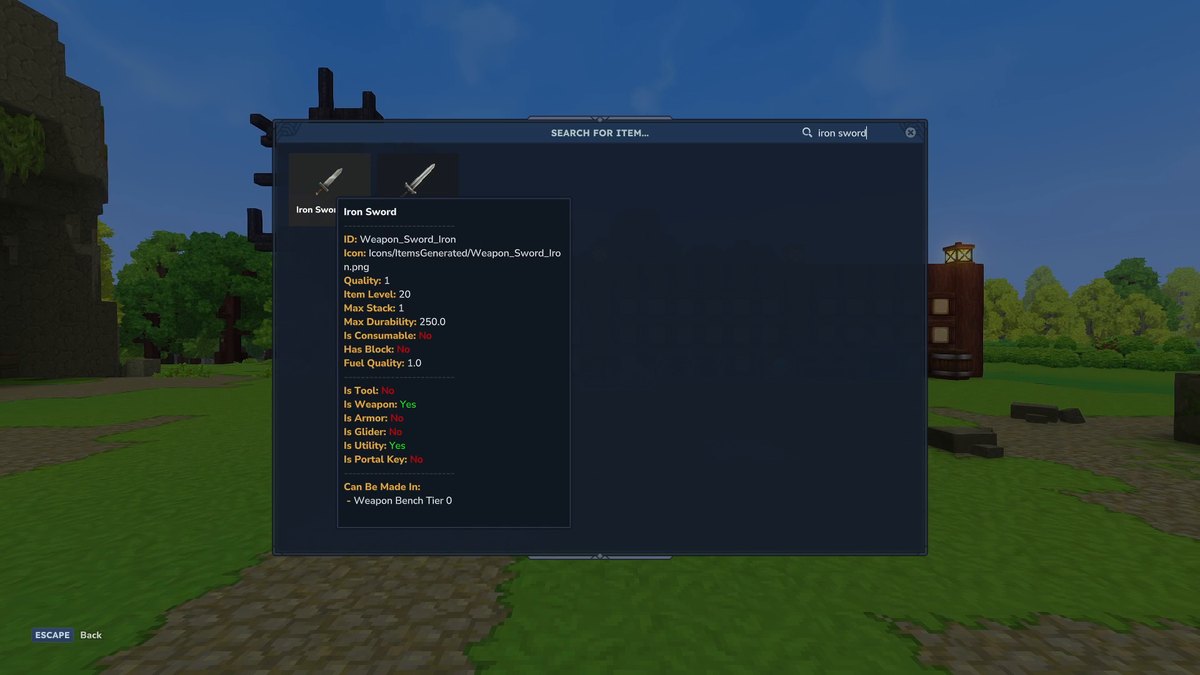
Advanced Item Info by Buuz135 opens a searchable overview of every item in the game with /aii (also /advancedinfo or /iteminfo). Hover over an item to see its ID, quality, item level, stack size, durability, fuel quality, whether it’s a tool, weapon, armor, glider or block, and where it can be made, for example the Weapon Bench tier 2.
How I set it up: nothing to set up. I typed /aii and searched for “iron sword”. One detail from my world settings: the mod declares game version 0.6 or newer, and it ran without problems in 0.7.2.
Version: I tested 1.0.8 (August 26, tagged for 0.7), still the newest on October 22. Over 337,000 downloads, MIT license.
Needs: nothing. Runs on: the server or your own world. Known issues: none listed on the mod page.
Advanced Item Info on CurseForge
#4 Adoa’s Minimap
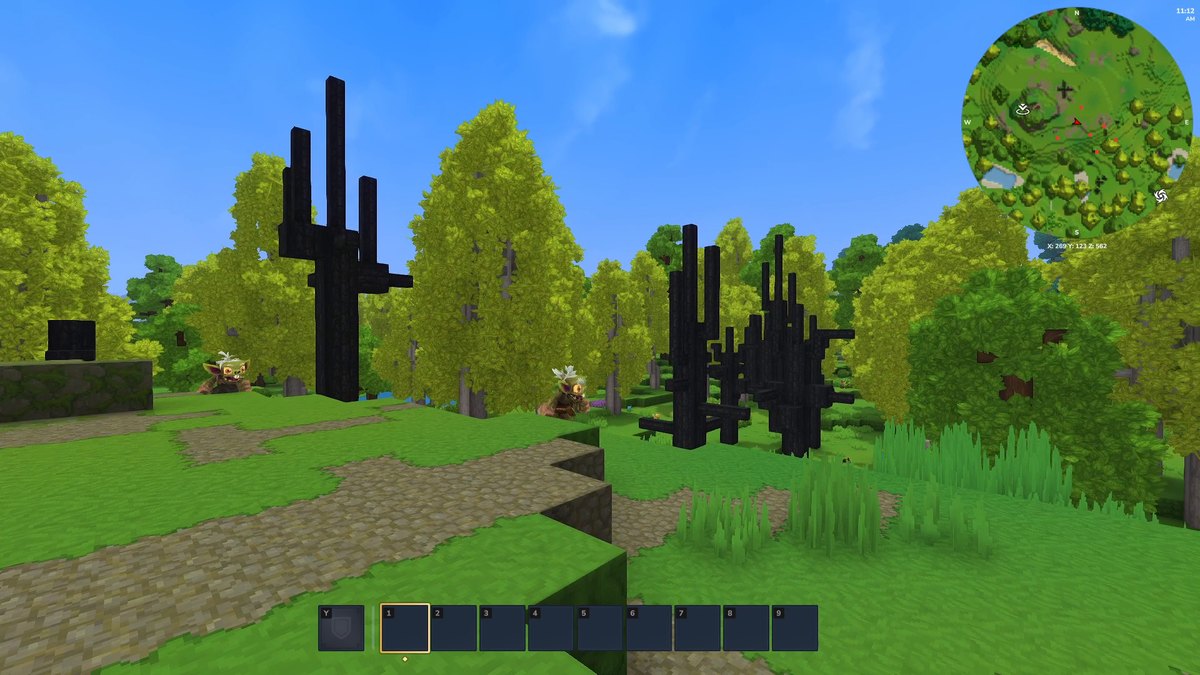
Hytale has a world map, but no minimap. Adoa’s Minimap by Landscaper adds one in the top right corner, with the four directions, your coordinates and the in-game time. It also has a WAILA panel that shows what you’re looking at.
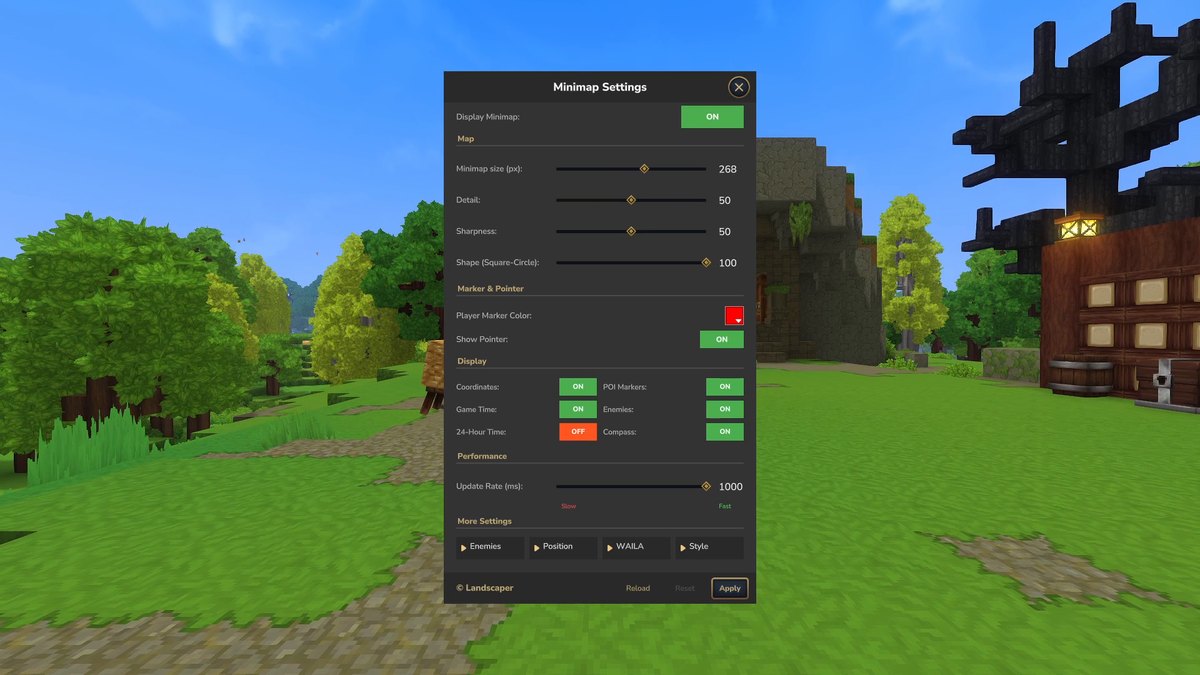
How I set it up: /minimap settings opens a window with sliders for size (268 px in my screenshot), detail, sharpness and shape (square to circle), switches for coordinates, game time, POI markers, compass and Enemies, an update rate, and more pages for enemies, position, WAILA and style. Enemies is off by default; I switched it on and clicked Apply, and every goblin around me showed up as a red dot. /minimap toggle hides and shows the map.
Version: I tested SimpleMinimap 10.0.1 for 0.7.0 (October 12), still the newest on October 22. Over 17,000 downloads.
Needs: MultipleHUD, according to the mod page; CurseForge lists it in the mod’s relations.
Runs on: the server or your own world. The /minimap commands need operator rights or the mod’s permissions; the page asks you to make yourself operator (or have the server owner add the permission nodes) before you use the settings.
#3 Repair Workbench
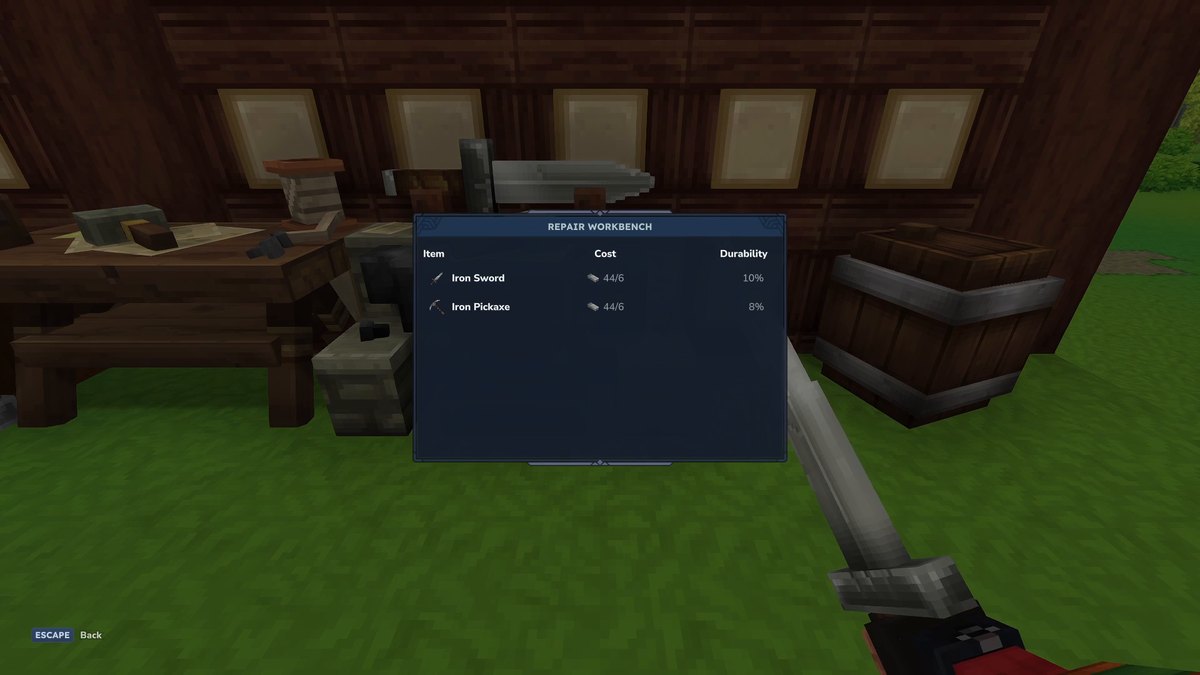
Repairing a tool the vanilla way lowers its maximum durability, as the mod’s documentation explains. Repair Workbench by BjornV adds a bench that restores both the current and the maximum durability. It lists every damaged item in your inventory with its durability and repair cost; click one, and it’s done. According to the mod’s documentation you craft it with a tier 2 Workbench from iron, wood and stone, the cost matches the item’s material (iron bars for iron tools, adamantite bars for adamantite) and rises with the damage, and the bench pulls materials from chests nearby, just like other workbenches. Items you can’t afford are greyed out.
What I saw: an iron sword at 10% and an iron pickaxe at 8% durability cost six iron bars each and came back at full durability.
Version: I tested 2.7.5 (October 12). Version 2.8.0 followed on October 16; I haven’t tested it yet. Over 40,000 downloads.
Needs: nothing. Runs on: the server or your own world. Server owners set the costs in the mod’s config.json and apply changes with /repairbench reload.
Good to know (documentation): the bench is meant to stay at your base: when you break it, it drops its crafting materials, not itself. Filled water containers can’t be repaired, because their durability is the fill level.
Repair Workbench on CurseForge
#2 Automatic Storage
Automatic Storage by Exlcior adds the Automatic Storage Crate. Put your loot into it, and it moves every item into a nearby chest that already holds the same item. According to the mod page you craft it at a tier 2 Tinkering Workbench, by default from 5 Concentrated Life Essence, 20 Copper Bars, 20 Iron Bars and 1 Gold Bar.
How I set it up: crouch and press F at the crate to open its settings: sort by identical item or by item category, “Transfer anywhere if missing” for items no chest holds yet, “Ignore this chest”, and the range. By default it reaches 14 blocks sideways and 6 up and down; the server sets the maximum. In my test the loot from the crate went straight into the matching chests of my storage wall.
Version: I tested 1.6.1 (October 13), which was marked as a beta for Update 7 at the time; on October 22 CurseForge lists it as a release, still the newest. Over 50,000 downloads.
Needs: nothing. Runs on: the server or your own world. Admins reload the settings with /autostorage reload.
Known issues (mod page): the window warns that sorting by item category may be inconsistent for some categories. Bug reports go to the author’s Discord.
Automatic Storage on CurseForge
#1 Where this at?
Where this at? by Buuz135 adds the Inventory Lectern. It scans every chest within 15 blocks and lists all items in one window. Search for anything, left-click to pull a full stack into your inventory (right-click for a single item), and use Clean Inv or Clean Hotbar to put everything back into the chests.
How I set it up: the lectern is made at the Workbench (Tinkering) from 4 wood trunks and 2 iron bars. I placed it in front of my storage wall. Clean Inv only put items into chests that already held the same item. The mod page also mentions a mode that highlights the chest an item is in; in my recording it didn’t show anything visible.
Version: I tested 1.0.13 (October 12), still the newest on October 22. Over 109,000 downloads, MIT license.
Needs: nothing. Runs on: the server or your own world. Known issues: none listed on the mod page.
More Hytale pages
- 5 Hytale mods that already work in Update 7, with my full install guide.
- 5 more Hytale mods that work in Update 7: bosses, levels, skill trees.
- Everything new in Hytale Update 7.
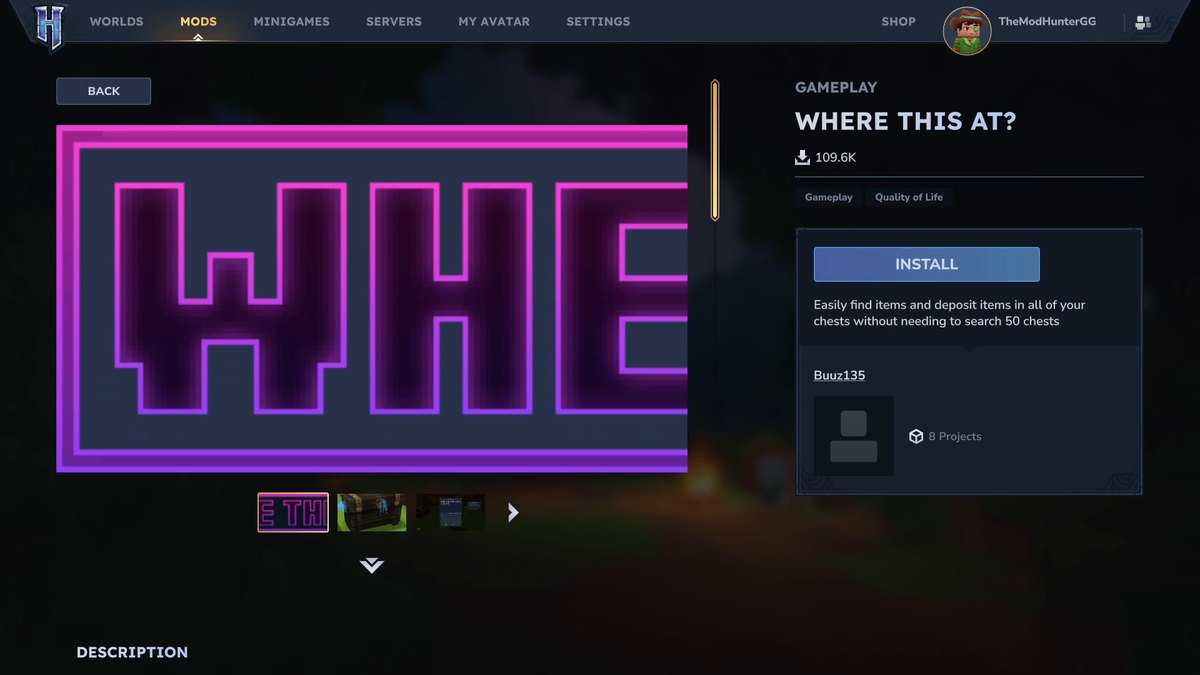
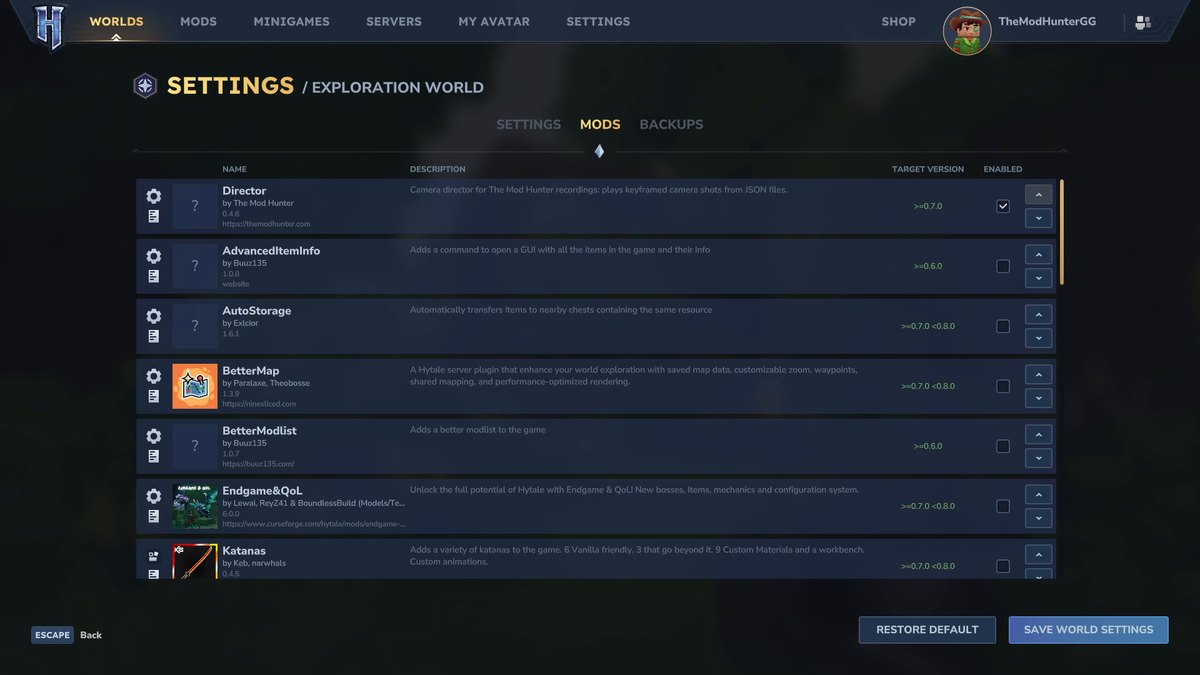
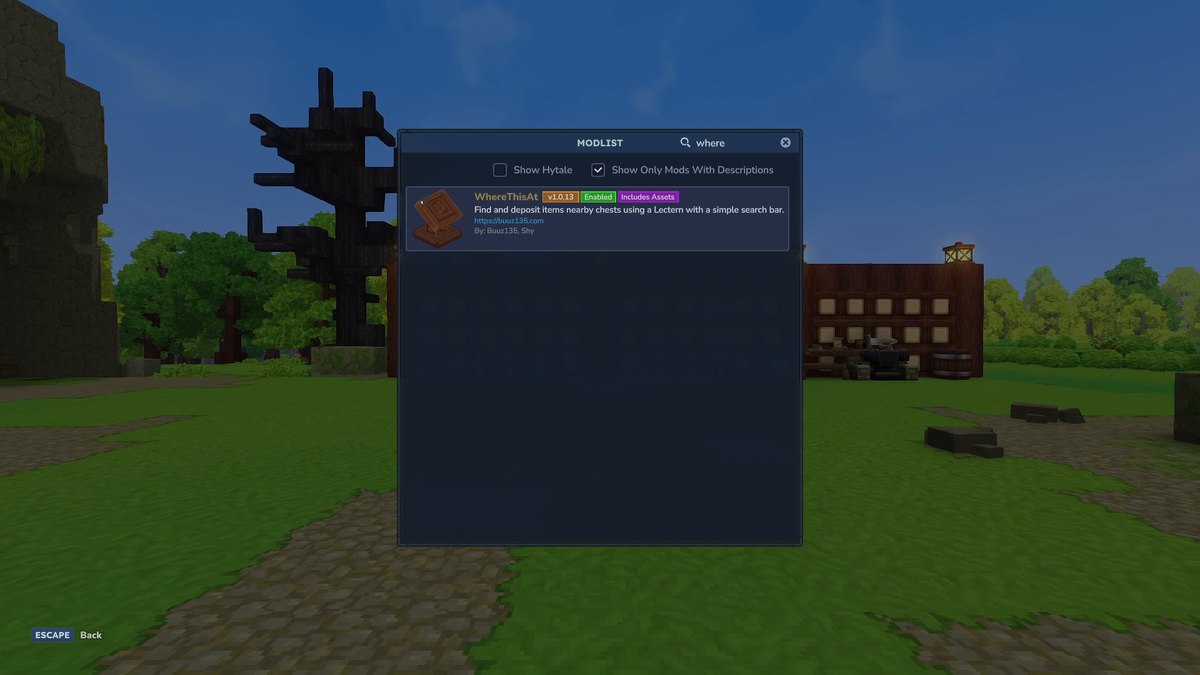
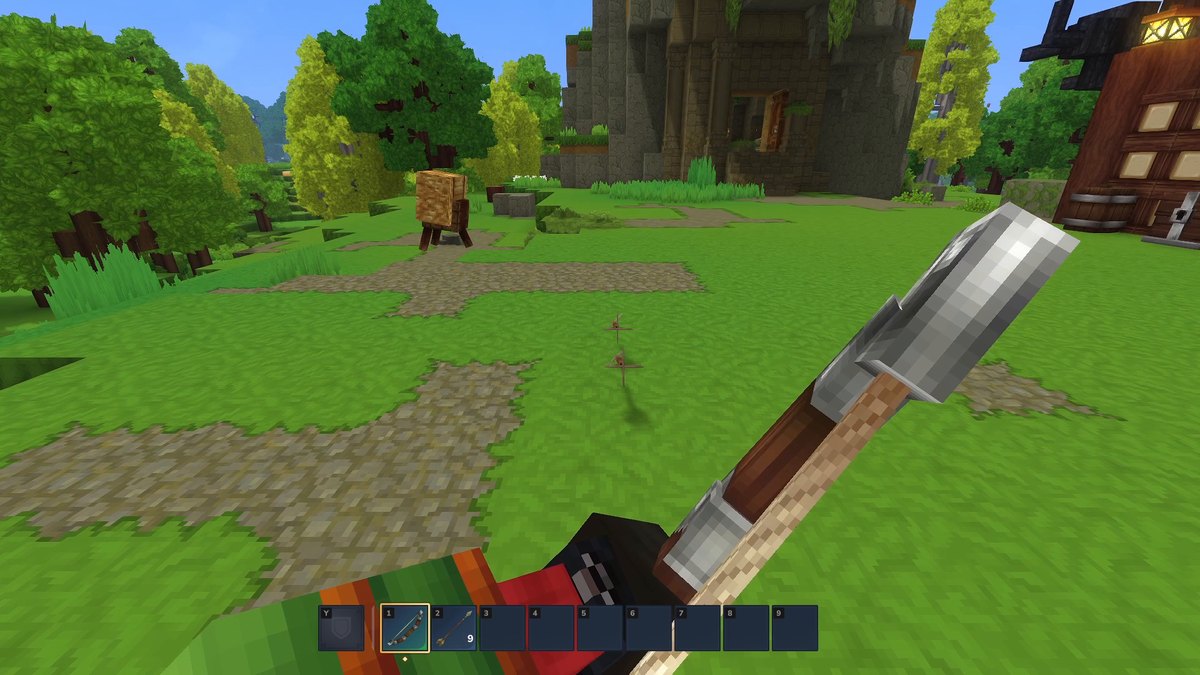
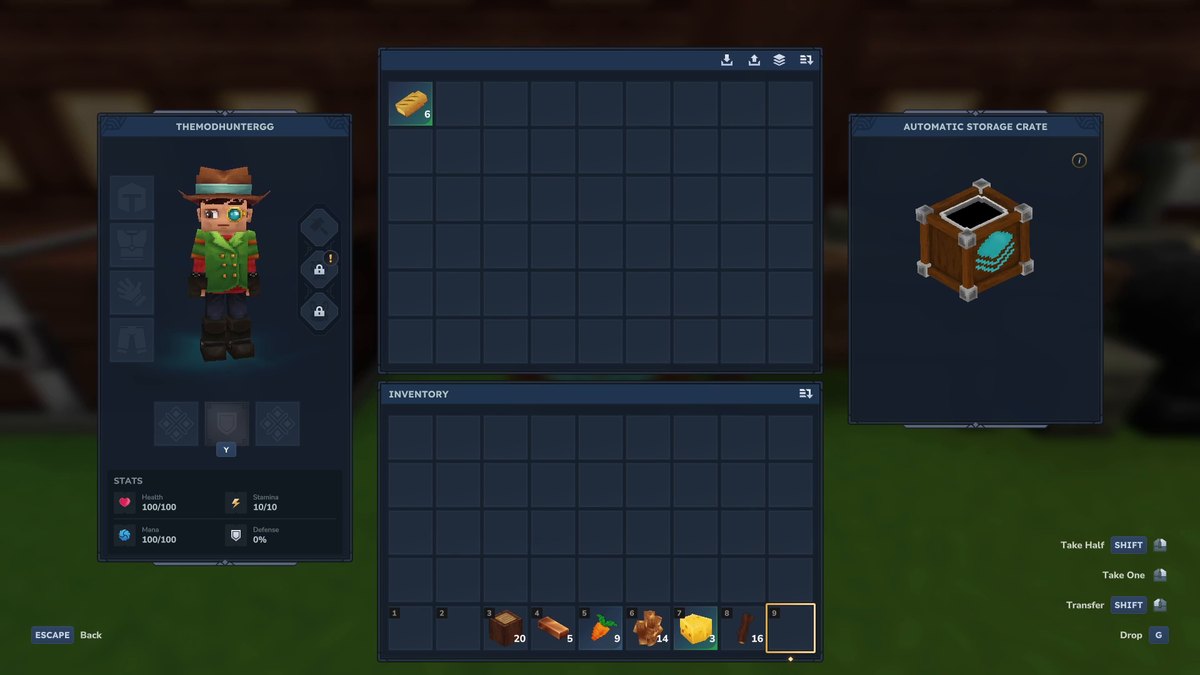
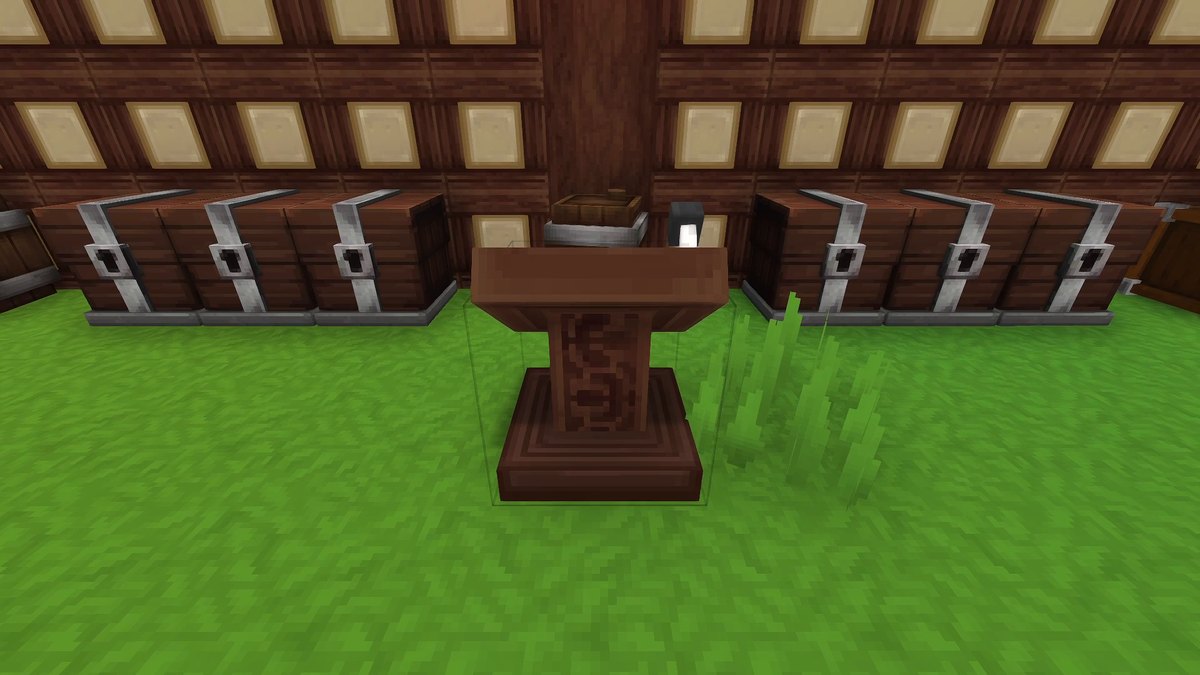
Real in-game screenshots from Hytale Update 7 (0.7.2), recorded in The Mod Hunter's test world on October 14, 2026. The storage wall was built for the video, the chests were filled and the goblins were spawned with commands, and the goblins were frozen for the minimap shot.
FAQ
Do these mods work in Hytale Update 7?
Yes. All seven have a file for Update 7 (game version 0.7) on CurseForge, and I tested every one of them in Hytale 0.7.2 on October 14, 2026. Repair Workbench has a newer Update 7 file since then, which I haven’t tested yet.
How do I install Hytale mods?
Since Update 6, Hytale has its own mod browser: click Mods in the main menu, search for a mod and hit Install. Then go to Worlds, right-click your world, open the Mods tab, switch the mod on and click Save World Settings. Every world keeps its own mod list. The CurseForge app and the manual way work too; all of it, plus fixes for common problems, is in my Hytale install guide.
Do Where this at? and Automatic Storage work together?
Yes, I used both on the same storage wall. Automatic Storage puts your loot into the chests that already hold the same item, and the lectern from Where this at? then finds it in any chest within range.
Does the minimap show enemies?
Yes, but it’s off by default. Type /minimap settings, switch Enemies on and click Apply. In the same window you change the size, shape, detail and colors.
Does Recover Arrows bring back every arrow?
No, just like in Minecraft only missed shots stay on the ground; arrows that hit a mob are gone. In my test I shot three arrows: one hit the target dummy and was gone, the two misses came back when I walked over them.
Does the Repair Workbench cost anything?
Yes, bars of the item’s material, and more the more damaged the item is. In my test an iron sword at 10% and an iron pickaxe at 8% durability took six iron bars each. They came back at full durability without losing any max durability.
How did you pick them?
I went through the most downloaded Hytale mods on CurseForge and only kept quality of life mods with an Update 7 file that you can actually see working on camera. The order is my own pick, not a download ranking.
Sources
- Where this at?, CurseForge
- Automatic Storage, CurseForge
- Repair Workbench, CurseForge
- Repair Workbench documentation
- Adoa's Minimap, CurseForge
- Advanced Item Info, CurseForge
- Recover Arrows, CurseForge
- Better Modlist, CurseForge
- Hytale Update 6 patch notes (in-game mod browser)
- Hotfixes: Update 7 (mod browser fix in 0.7.1), hytale.com